<HTML>
Q. What is an element?
- Elements describe how data should appear in a browser.
Q. What is an attribute?
- A tag attribute provides additional information about an HTML element.
<tag attribute = “value”>- the src attribute of the <img> tells the browser where to locate the image to be displayed
<img src = “images/image.jpg”>Q. How to define/close an element
- A tag is used to define an HTML element.
- form: <tagname></tagname>
- Most but not all elements have an opening/closing tag
Q. How to write a comment
<!-- HTML Comment -->Q. What is a DOCTYPE declaration?
- DTD: Document type declaration
- DTD tells the browser the version of HTML
- DTD must be the first line
- HTML5: <!DOCTYPE html> (does not have a closing tag)
Q. Common HTML elements and their attributes
<html>
- the parent element for all other elements
- can also indicate the spoken language, i.e. <html lang=“en”>
- holds two sections; head and body
<head>
- holds information about the webpage; title, encoding, links to scripts and CSS files, metadata for search engines
<title>
- holds titles of the page that is displayed in the browser and by search engines
<meta>
- describes a characteristic of the webpage
- does not have a closing tag
<body>
- contains the code for the visual part of your web page
<a>
- used to create Hyperlinks to other web pages
- text or images contained in an anchor tag with an href attribute -> hyperlink
- define an anchor point on a page; linked within the document
<a href = ”http://www.google.ca”>Google<a><a name=”top”></a> -> <a href=”#top”>Return to top</a><h1> - <h6>
- size of headings; h1 is the biggest, h6 is the smallest
<p>
- contains a paragraph element, by default, is aligned to the left
<strong>
- appear in bold
<em>
- appear in italics
<fieldset> & <legend>
- warp the elements with a box and legend give the name on the box
<div>
- division, to make a layout(frame), has style, width, height, border, etc… attributes
<div style="..."><span>
- to make a layout(frame), cannot use width or height to size (has inline attribute)
<ul>, <ol> and <li>
- Un-ordered list, Ordered list, and list items
<img>
- defines an image in an HTML page, stand along with the tag
- requires two parameters; src and alt
- alt: description of the image, when users have disabled images and used by search engines and screen readers
- width & height, id, title(contains advisory information about the image when hovering)
Tables
(NOTE: There was an error in the slides regarding the <table> element's border attribute.
The only acceptable values are "" (blank string), or 1, according to the HTML 5 specification.
<table>
- all information for a table is contained
<tr>
- rows
<th>
- table header, default in bold
<td>
- table data or cells; number of td in a row defines columns
colspan and rowspan
- <td> and <th> attributes (셀 병합 느낌)
colspan
- defines the number of columns a cell should cover
rowspan
- defines the number of rows a cell should cover
<thead>, <tbody>, and <tfoot>
- group row elements <tr>
Forms
<input> element types (stand-alone elements)
1. type
2. name
3. id (in general, same with name)
- Textbox
(+) value(initial value), maxlength
<input type="text" name="firstName" id="firstName">- Submit button
(+) value: text in the button
<input type="submit" name="btnSubmit" id="btnSubmit" value="Submit Form">- Reset button
<input type="reset" name="btnReset" value="Reset Form">- Checkbox
(+) checked: default checked
<input type=“checkbox” name=“agreeToTerms” id=“agreeToTerms” value=“yes”>- Radio button
Male <input type=“radio” name=“gender” id=“genderMale” value=“male”>
<br> Female <input type=“radio” name=“gender” id=“genderFemale” value=“female”>
- Password field
<input type=“password” name=“password” id=“password”> Textarea
(+) cols(width of the textarea), rows(height of the textarea)
<textarea name=“comments” id=“comments” cols=“40” rows=“6”>Enter comments</textarea>select-option
- dropdown list (size="1")
<select name=“favColor” id=“favColor” size=“1”>
	<option>Select a color</option>
    <option value=“red”>Red</option>
    <option value=“blue”>Blue</option>
    <option value=“green”>Green</option>
</select>
- option box (size>1)
(+) multiple (allows choose muliple items), disabled (prevents a user from selecting the disabled option)
<select name=“favColor” id=“favColor” size=“4”>
	<option disabled>Select a color</option>
    <option value=“red”>Red</option>
    <option value=“blue”>Blue</option>
    <option value=“green”>Green</option>
</select>
<form>
- method: get & post
- get: data will be appended to the URL
- post: transmits data in the body of the HTTP request
- action
- URL of server-side processing script
- name
- used to identify the form
- autocomplete
- tells the browser to remember values entered in these fields
- id
- a unique identifier; cannot be the same as any other id value on the page
<CSS>
The ways to apply CSS
1. Inline
- apply to an HTML element
- Do not use the selector
<p style=“text-align:center;”> <body style=“color:#FF0000;”>
<p>This text will appear red</p>
<p style=“color: #0000FF;”>This text will appear in blue</p>
</body> 2. Embedded
- <style> element in the <head>
- Applies to the entire document where it is defined
<style>
p { color: #FF0000; }
h1 {color: #0000FF; }
</style>
3. External
- in an external style sheet
- useful for defining styles across multiple pages
<link href=“css/style.css” rel=“stylesheet”>
The Rules of Precedence
Browser Defaults -> External Styles -> Embedded Styles -> Inline Styles
CSS Style rule (syntax)
td { background-color: #FF0000; }
CSS Colors
- color (text color)
- background-color
- Hexadecimal(#FF0000), Decimal(rgd(255,0,0)), Hue-Saturation-Lightness(hsl(0, 100%, 50%)), Color words(red)
CSS Selectors
- to identify which element a CSS rule applies to
- include HTML element, class, and id
(1) HTML element
p { text-align: center; }(2) class
- In embedded and external stylesheets
<p class="red">This is red text.</p>
.red { color: #FF0000; }
(3) id
- In embedded and external stylesheets
<div id="header">
#header { text-align: center; }
Q. What is the difference between id and class?
- The id applies to a single element, however, a class applies to all elements of the class
Descendent selector
- can define a style for an element in the context of a container element
#header h1 { color: #00FF00; }
#header .nav li { color: #0000FF; }
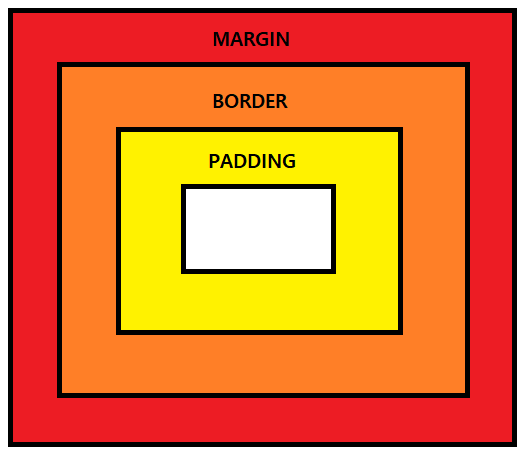
The CSS box model
Margin: the non-visible space outside of the element
Padding: the space between the border and the content
CSS Positioning
1. static
- default
div.static {
  position: static;
  border: 3px solid #73AD21;
}
2. fixed
- relative to the browser window
- means it always stays in the same place even if the page is scrolled
div.relative {
  position: relative;
  left: 30px;
  border: 3px solid #73AD21;
}
3. relative
- relative to its static position
div.fixed {
  position: fixed;
  bottom: 0;
  right: 0;
  width: 300px;
  border: 3px solid #73AD21;
}
4. absolute
- relative to the first non-static parent element
- positioned relative to the nearest positioned ancestor (instead of positioned relative to the viewport, like fixed)
- A "positioned" element is one whose position is anything except static
div.relative {
  position: relative;
  width: 400px;
  height: 200px;
  border: 3px solid #73AD21;
}

div.absolute {
  position: absolute;
  top: 80px;
  right: 0;
  width: 200px;
  height: 100px;
  border: 3px solid #73AD21;
}
Modifying Text with CSS
1. text-align
- positions the text; left, center, right or justified
2. font-weight
- the thickness of letters; lighter, normal, bold, bolder
3. color
4. text-decoration
- sets decoration to the text; underline, overline, line-through
Modifying Table with CSS
1. width
2. border-spacing
- space between cell borders
3. border
- the border of the table not the cells
4. border-collapse
- collapse: not space between borders; separate(the default value): space between borders
<style>
table {
  border-collapse: separate;
  border-spacing: 5px;
}

table, td, th {
  border: 5px solid black;
}
</style>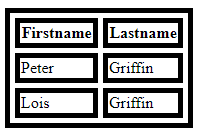
Modifying Table cells with CSS
1. color
2. background-color
3. padding
- the amount of space between the cell contents and the border
<style>
table {
  border-collapse: collapse;
  border-spacing: 5px;
}

table, td, th {
  border: 5px solid black;
  padding: 10px;
}
</style>
Float Property
- the float property can be used to wrap text around images
- floated horizontally (right or left, not up or down)
- text elements found after will flow around it, however, before will not be affected
- absolutely positioned ignore the float property
<JavaScript>
Static vs. Dynamic web pages
| Static | Dynamic |
| does not change | content that changes without edit the source code |
| do not allow for user input/interaction | most webpages have some dynamic content |
Client vs. Server side
Client: code runs in the browser
Server: code runs on the server
| Client Side | Server |
| Javascript, Angular.js, jquery | PHP, PHP frameworks(Laravel, CakePHP), Ruby on Rails, Python, C# |
| Has direct access to the browser and the page elements | Does not have access to the browser |
| Unreliable | Reliable |
How to add JavaScript to a web page?
(1) Inside <script> element
<script>
	document.write("Hellow World");
</script>
(2) Link to a JavaScript file
<script src="script/jquery.js"></script>
How to declare a function?
(1) A basic function
function myFunction () {
	//do stuff here
}
(2) Function with parameters
function myFunction (param1, param2){
	//do stuff here
}
How to declare a variable?
var myName = “Matt”;
var myName;
declared outside: global scope
declared inside: the local
= assignment operator
Data types
1. String
- single or double quotes; quotes in a string != container quotes
var a = “hello world!”;
var b = ‘hello world!’;
var c = “55”;
var statement = “He said ‘Hello World!’ to me.”;
- added together using +
var firstName = “Matt”;
var lastName = “LaCasse”;
var fullName = firstName + “ “ + lastName;
2. Number
- only one number type
- with or without a decimal
var a = 50;
var a = 50.5;
- very large or small numbers can be written in scientific notation
 var a = 19e7; //190000000
 var a = 12e-7 //.0000012
3. Boolean
var isThisANumber = false;
var isThisABoolean = true;
4. Arithmetic Operators
+, -, *, /, %, ++, --
5. Assignment Operators
=, +=, -=, *=, /=, %=
6. Comparisons
==, ===, !=, !==, >, <, >=, <=
=== exactly equal (type and value)
7. Logical Operators
&&, ||, !
8. Conditional statements
- if-else if-else
if (expression1){
	//do something if expression 1 is
    //true
} else if (expression 2){
	//do something if expression 2 is
    //true
} else {
	//do something if neither
    //expression is true
}
- switch
(default if there is no match)
switch(variable)  {
	case 1:   //do something
    	break;
    case 2:   //do something
    	break;
    default:  //do this if none of the above
    		  //cases are true
}
9. Prompt
var name = prompt(“What is your name?”);
var name = prompt(“What is your name?”, “noname”);
10. Alert
alert(“Transaction was successful.”);
11. parseFloat and parseInt
12. The onclick event
- the button is clicked, the function will run
<input type=“button” name=“btnConvertTemp” id=“btnConvertTemp”
	onclick=“convertTemp();” value=“Convert Temperature”>
13. The Document Object
- provides the link between web pages and programming language
- organizes HTML elements into objects
- elements, attributes, and comments are nodes
- the document object is the root node
Key Document Object Properties
| document.cookie | return name/value pairs for all cookies |
| document.forms | return an array of all forms |
| document.images | return an array of all images |
| document.title | set or return the title |
| document.URL | return the full URL |
Key Document Object Methods
| document.getElementById() | return an element based on its id |
| document.write() | write text or HTML code |
| document.getElementsByTagName() | return a NodeList of all elements |
| document.createElement() | creates a new element |
14. The Element Object
- represents an HTML element from a web page
- child nodes: nodes contained within an element object
- all types of elements have shared properties and methods
Key Element Object Properties
| element.attributes | return a NamedNodeList of all attributes |
| element.id | set or return the id |
| element.innerHTML | set or return the content of an element |
| element.className | sets or return the class of an element |
Key Document Object Methods
| element.setAttribute() | set the named attribute's value |
| element.clodeNode() | clones an element |
| element.appendChild() | appends a new node |
| element.insertBefore() | inserts a new node before specified child node |
| element.removeChild() | removes a specified child node |
15. Arrays
- properties and methods
1. length: returns or sets the number of elements in an array
2. sort(): sorts an array's elements
3. push(): adds a new element onto the end
4. concat(): joins two or more arrays, return the array
var newArray = new Array();
var newArray = ["Item1", "Item2", "Item3"];
var newArray = new Array("Item1", "Item2", "Item3");
<PHP>
Q. How to create a PHP file?
- defined by .php extension
- An HTML page can be changed into a PHP page
Q.. Where to place PHP code in a file?
- <?php ?>
- anywhere inside a PHP document
Q. How to run a PHP file?
- must be run on a server to run
- to run, copy it to the htdocs folder
- http://localhost/yourFileName.php
echo and print()
- both write text inside the HTML document before it is sent to the browser
- echo has no return value; print has a return value of 1
- echo takes multiple parameters; print takes one argument
<?php
echo "<h2>PHP is Fun!</h2>";
echo "Hello world!<br>";
echo "I'm about to learn PHP!<br>";
echo "This ", "string ", "was ", "made ", "with multiple parameters.";
?>
<?php
$txt1 = "Learn PHP";
$txt2 = "W3Schools.com";
$x = 5;
$y = 4;
echo "<h2>" . $txt1 . "</h2>";
echo "Study PHP at " . $txt2 . "<br>";
echo $x + $y;
?><?php
print "<h2>PHP is Fun!</h2>";
print "Hello world!<br>";
print "I'm about to learn PHP!";
?><?php
$txt1 = "Learn PHP";
$txt2 = "W3Schools.com";
$x = 5;
$y = 4;
print "<h2>" . $txt1 . "</h2>";
print "Study PHP at " . $txt2 . "<br>";
print $x + $y;
?>
Declaring variables
- using $
- must start with an underscore or a letter
- cannot start with a number
Assigning variables
- the default way to assign variables is to by-value
- to assign by-reference, using an ampersand (&)
Variable Scope
- the context in which the variable is defined
- variables declared outside of a custom function are not available within that function
- to use an out of context variable, use the global keyword
global scope
<?php
$x = 5; // global scope

function myTest() {
    echo "<p>Variable x inside function is: $x</p>";
    // output: Variable x inside function is:
}
myTest();

echo "<p>Variable x outside function is: $x</p>";
// output: Variable x inside function is: 5
?>
local scope
<?php
function myTest() {
    $x = 5; // local scope
    echo "<p>Variable x inside function is: $x</p>";
    // output: Variable x inside function is: 5
}
myTest();

// using x outside the function will generate an error
echo "<p>Variable x outside function is: $x</p>";
// output: Variable x inside function is:
?>
global keyword
<?php
$x = 5;
$y = 10;

function myTest() {
    global $x, $y;
    $y = $x + $y;
}

myTest();
echo $y; // outputs 15
?>
PHP Datatypes
- loosely typed: do not need to specify the data type
1. Boolean
- defined by assigning a variable either the true or false keyword without quotes
- case-insensitive
$myBool = true; 2. Integer
- can be specified in decimal, hexadecimal, octal or binary notation
- no division for integers; yield a float
3. Float(double)
4. String
$myVar = ‘this is a string’;
$myVar = “this is also a string”;
$helloWorld = “Hello “ . “World!”;
5. gettype() function
$x = 10;
echo gettype($x); //would output ‘integer’

$y = 11.5;
echo gettype($y); //would output ‘double’ not 'float'
Arithmetic operators
+, -, *, /, %
Comparison operators
==, ===, != <>, !==, <, >, <=, >=
Logical operators
and, or, xor, !, &&, ||
xor: either of them is true but not both
Conditional statements
1. If you only want to execute one statement
if($x > $y) echo ‘$x is the larger number’; 2. if you want to execute one or more statements
if ($x > $y){ echo ‘$x is the larger number’; $y++; }
Sessions
- To persist information between pages
- use a unique identifier that is generated when a website is first displayed
- used throughout the duration of the user's visit
- 24 minutes default timeout
- session.gc_maxlifetime,(in php.ini file) session_set_cookie_params(seconds): to change the timeout
$_SESSION
- superglobal that can store data for specific session id
- Session data is stored in a session file on a server
- session_start(): requires the use of $_SESSION must call this; page no call then no access the $_SESSION
- associative array
$_SESSION[‘shoppingCart’] = $shoppingCart;
session_write_close()
- takes whatever data is in the $_SESSION variable and writes it to the disk
- thereby freeing up $_SESSION to other scripts; because by default, scripts will lock the $_SESSION object until they are finished running
session_unset()
- clear all the variables saved in $_SESSION; not delete the session file, whatever in the array at the end of the script will be saved to the session file
session_destroy()
- destroys the session and removes the session file
- you can still work with the $_SESSION variable until the end of the script
- does not re-generate the Session ID
session_regenerate_id()
- does not clear current session data; does not destroy the session
$_GET and $_SET
- associative arrays
- superglobals: can access anywhere in PHP script
$userName = $_GET["yourName"];- $_POST is sent to the server via the HTTP POST method
- To access $_POST, use name attribute of the form field
$firstName = $_POST[“firstName”]; - isset(): returns true if the variable is set(has a value)
PHP Arrays
1. Indexed Array
<?php
$paper[]  = "Copier";
$paper[] = "Inkjet";
$paper[] = "Laser";
$paper[] = "Photo";

print_r($paper);
//   output:
//   Array
//   (
//    [0] => Copier
//    [1] => Inkjet
//    [2] => Laser
//    [3] => Photo
//   )
?>
2. Associative Array
- by name instead of by number
- names are called indexes
<?php
   $paper['copier'] = "Copier & Multipurpose";
   $paper['inkjet'] = "Inkjet Printer";
   $paper['laser'] = "Laser Printer";
   $paper['photo'] = "Photo Printer";
?>
3. Multidimensional Array
$products = array(
	'paper' => array(
		'copier' => "Copier & Mulipurpose",
		'inkjet' => "Inkjet Printer"),

	'pens' => array(
		'ball' => "Ball Point",
		'hilite' => "Highlighters"),

	'misc' => array(
		'tape' => "Stickey Tape",
		'glue' => "Adhesives",
		'clips' => "Paperclips")
);

foreach($products as $section => $items)
	foreach ($items as $key => $value)
		echo "$section:\t$key\t($value)\n";

//paper:	copier	(Copier & Mulipurpose)
//paper:	inkjet	(Inkjet Printer)
//pens:	ball	(Ball Point)
//pens:	hilite	(Highlighters)
//misc:	tape	(Stickey Tape)
//misc:	glue	(Adhesives)
//misc:	clips	(Paperclips)
Array Functions
1. is_array()
2. count()
3. sort()
- ascending order
4. shuffle()
5. explode()
- Takes a string and places it into an array
6. extract()
- Creates associative arrays from GET and POST arrays
- Imports variables into the current symbol table from an array
7. compact()
- Creates arrays from variables
8. reset()
- Places the pointer to the first element
9. end()
- Places the pointer to the last element
MySQLi
- provides an API for PHP applications to access and use a MySQL database
- provides an interface for both procedural and OOP paradigms
- The constructor takes 4 arguments: Database host, Username, Password, Database Name
$mysqli = new mysqli(‘127.0.0.1’, ‘root’, ‘password’, ‘db_name’); function __construct() {
try{
$this->mysqli = new mysqli(self::$DB_HOST, self::$DB_USERNAME,
self::$DB_PASSWORD, self::$DB_DATABASE);
}catch(mysqli_sql_exception $e){
throw $e;
}
}Important properties
1. connect_errno, connect_error
- information about connection errors
2. errno, error
- information about non-connection related errors
3. affected_rows
- the number of rows affected by the previous query
4. query()
- accepts an SQL query and returns a mysql_result object
5. prepare()
- accepts an SQL query returns a statement object
public function authenticate($username, $password){
    $loginQuery = "SELECT * FROM adminusers WHERE Username = ? AND Password = ?";
    $stmt = $this->mysqli->prepare($loginQuery);
    $stmt->bind_param('ss', $username, $password);
    $stmt->execute();
    $result = $stmt->get_result();
    if($result->num_rows == 1){
       $this->username = $username;
       $this->password = $password;
       $this->authenticated = true;
    }
    $stmt->free_result();
}
The mysqli_stmt class
- contains methods to prepare and execute a prepared statement
- error & errno
- affected_rows
- prepare()
- bind_param(): used to bind variables to a prepared statement as parameters
- execute()
- get_result()
The mysql_result class
- num_rows
- field_count
- fetch_assoc(): returns the next row in the result as an associative array
- free()
- fetch_row(): returns the next row as an enumerated array
public function getCustomers(){
        //The query method returns a mysqli_result object
        $result = $this->mysqli->query('SELECT * FROM mailinglist');
        $mailingList = Array();

        if($result->num_rows >= 1){
            while($row = $result->fetch_assoc()){
                //Create a new customer object, and add it to the array.
                $customer = new Customer($row['customerName'], $row['phoneNumber'], $row['emailAddress'], $row['referrer']);
                $mailingList[] = $customer;
            }
            $result->free();
            return $mailingList;
        }
        $result->free();
        return false;
    }
Object-oriented PHP
Classes
- To use an object you need to create a class
- Encapsulation: this is a method whereby only the methods inside the class can manipulate its properties
<?php

   $object = new User;

   class User
   {
      public $name, $password
      // the variable $name and $password are the properties of the class User

      // The save_user  function inside the class User is called a method
      function save_user()
      {
         echo "Save User code goes here";
      }

   }
?>
Accessing Objects
"->" pointer allows access to the class's properties and methods
// assigned the object
$object = new User;

// sets the value of the name property in the class User
$object->name = "Michael";

// sets the value of the password property in the class User
$object->password = "pass123";

// calls the method save_user in the class User
$object->save_user();
Methods
- $this
- No $ when using "->"
<?php
$mypass = new User;
echo $mypass->get_password();

   class User
   {
      public $name = "Michael";
      public $password = "mypass";
      function get_password()
      {
         return $this->password;
      }
   }
?>
Properties
- const: keyword for defining Constant Properties
- Constant variables can be referenced using the self keyword and double colon operator
const tax = 0.13;
echo self::tax;
Methods and Property Scope
1. public
- default
2. protected
- can be referenced only by the class and subclasses of the object
3. private
- can only be referenced by that particular class
The extends operator
<?php

class Foo
{
    public function printItem($string)
    {
        echo 'Foo: ' . $string . PHP_EOL;
    }

    public function printPHP()
    {
        echo 'PHP is great.' . PHP_EOL;
    }
}

class Bar extends Foo
{
    public function printItem($string)
    {
        echo 'Bar: ' . $string . PHP_EOL;
    }
}

$foo = new Foo();
$bar = new Bar();
$foo->printItem('baz'); // Output: 'Foo: baz'
$foo->printPHP();       // Output: 'PHP is great'
$bar->printItem('baz'); // Output: 'Bar: baz'
$bar->printPHP();       // Output: 'PHP is great'

?>
The parent operator
<?php
class A {
    function example() {
        echo "I am A::example() and provide basic functionality.<br />\n";
    }
}

class B extends A {
    function example() {
        echo "I am B::example() and provide additional functionality.<br />\n";
        parent::example();
    }
}

$b = new B;
$b->example();

// I am B::example() and provide additional functionality.<br />
// I am A::example() and provide basic functionality.<br />
?>
Subclass Constructor
<?php
    class BaseClass {
        function __construct() {
            print "In BaseClass constructor\n";
        }
    }

    class SubClass extends BaseClass {
        function __construct() {
            parent::__construct();
            print "In SubClass constructor\n";
        }
    }

    class OtherSubClass extends BaseClass {
        // inherits BaseClass's constructor
    }

    // In BaseClass constructor
    $obj = new BaseClass();

    // In BaseClass constructor
    // In SubClass constructor
    $obj = new SubClass();

    // In BaseClass constructor
    $obj = new OtherSubClass();

// In BaseClass constructor
// In SubClass constructor
// In BaseClass constructor
// In BaseClass constructor
?>
The final keyword
- prevents child classes from overriding a method by prefixing the definition with the final.
- if the class itself is being defined final then it cannot be extended.
<?php
    final class BaseClass {
       public function test() {
           echo "BaseClass::test() called\n";
       }

       // Here it doesn't matter if you specify the function as final or not
       final public function moreTesting() {
           echo "BaseClass::moreTesting() called\n";
       }
    }

    class ChildClass extends BaseClass {
    }
    // Results in Fatal error: Class ChildClass may not inherit from final class (BaseClass)
?>